Every tennis club admin knows the routine. A player texts asking if court 3 is free Saturday at 10. The admin checks the calendar - if it's up to date - replies with availability, and manually adds the booking. Five minutes later, another player asks for the same slot. Now there's a conflict, and the admin is the referee.
Multiply that by every court, every day, and you have a part-time job that shouldn't exist. Weekend mornings become a flood of messages. Peak-hour slots turn into first-come-first-served chaos. And when the admin who "manages the calendar" is unavailable, nobody knows what's booked and what isn't.
The irony is that court booking is the single most frequent interaction between a club and its members. It's the one process that touches everyone, every week. And at most clubs, it's still held together by text messages and hope.
An automated booking system isn't complicated. At its core, it's a shared calendar where members see real-time court availability and reserve slots themselves - without calling, texting, or waiting for anyone.
But the difference between a basic calendar and a proper booking system is in the details. The details are what determine whether your members actually use it, whether your admins trust it, and whether it survives a busy Saturday morning without falling apart.
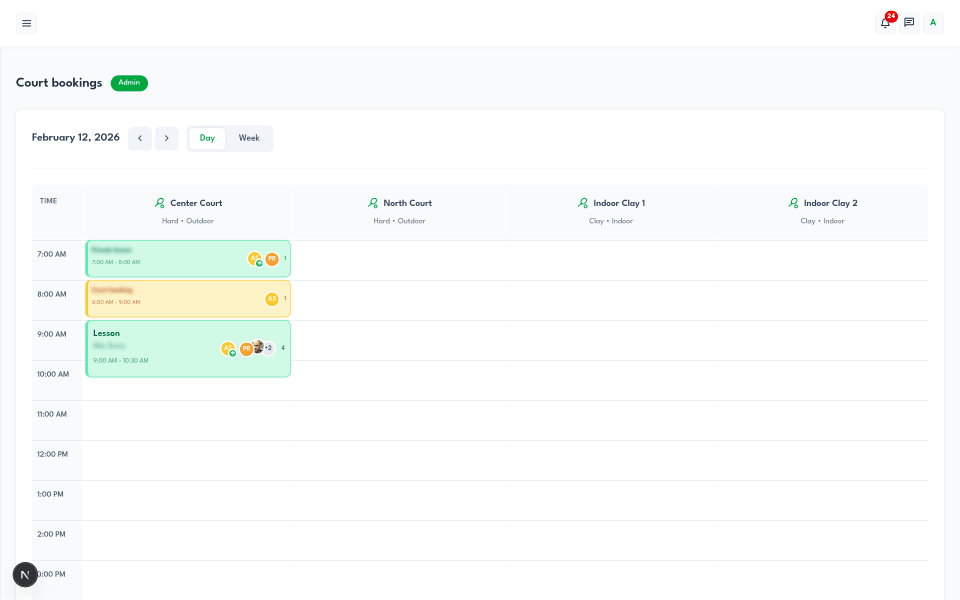
The foundation is a calendar view that shows every court's availability in a format anyone can read. A good booking system offers both a day view and a week view.
The day view shows a single day across all courts, typically from early morning to late evening, with each booking displayed as a color-coded block. You can see at a glance which courts are free, which are booked for lessons, and which are reserved for open play. Different booking types get different colors - amber for regular court bookings, emerald for coaching lessons, blue for open sessions, neutral for private blocks - so the calendar tells you what's happening, not just when.
The week view shows one court across the full week, making it easy to spot patterns: when peak hours are, which days have gaps, and where recurring bookings sit. Club admins use this view for planning; players use it to find their preferred weekly slot.
The key interaction is clicking an empty time slot. When you tap on a blank space in the calendar, the booking form opens with the court, date, and start time already pre-filled. That small detail - not having to manually enter information that's already obvious from context - is what makes the system feel fast rather than tedious.
This is the feature that justifies the entire system. Manual booking relies on humans catching conflicts. Automated booking makes conflicts impossible.
When someone creates a booking, the system checks every existing reservation on that court for time overlaps. It catches three scenarios: the new booking starts during an existing one, the new booking ends during an existing one, or the new booking completely contains an existing one. If any overlap is found, the booking is rejected before it's saved.
The same check runs when editing an existing booking - if you try to extend a 10:00-11:00 session to 10:00-11:30, the system verifies that the extra 30 minutes don't conflict with the next reservation. Cancelled bookings are excluded from the check, so cancelled slots become available immediately.
This sounds simple, and it is. But it eliminates the single biggest source of friction in court management: double bookings. No more "I thought I had court 2" conversations. No more admins mediating scheduling disputes. The system handles it, silently and reliably.
Not everyone at your club should have the same booking privileges. A system that lets anyone book anything creates a different kind of chaos - uncontrolled reservations, courts blocked by players who don't show up, and no accountability for who booked what.
A well-designed booking system ties permissions to member roles. Here's how this typically works in practice:
Club administrators have full control. They can create any type of booking - court reservations, coaching lessons, private time blocks for maintenance or events, and open sessions like happy hours. They can also edit or cancel any booking, assign instructors, and manage walk-in guests.
Coaches can create lessons (with themselves as the instructor) and regular court bookings. They see their teaching schedule, know which students are in each session, and can manage their own bookings - but they can't create private blocks or open sessions, which are admin-level operations.
Trusted players - reliable, active members who've earned elevated privileges - can create court bookings directly. No admin approval needed. They pick a court, pick a time, and it's done. This is the privilege that makes trusted status meaningful: it removes the friction of booking while keeping control over who has that privilege.
Regular members can view the calendar and see availability, but they can't create bookings on their own. Their bookings go through the admin, or through the club's established process. As they become regular, reliable participants, the admin can grant them trusted status to unlock direct booking.
This layered approach scales naturally. A 4-court club with 30 members might give trusted status to most regulars. A 12-court facility with 200 members might keep it tighter. The admin decides - the system enforces it.
A court reservation for Saturday morning doubles is fundamentally different from a Tuesday afternoon private lesson with a coach, which is different from a Friday evening open play session. A booking system that treats them all the same is missing the point.
A proper system supports distinct booking types, each with its own logic:
Court bookings are the standard reservation. A player (or group) books a court for a specific time. There's a main player associated with the booking, and optional additional participants for tracking purposes. Straightforward.
Lessons are coaching sessions with an assigned instructor. The system knows which coach is teaching, which students are participating, and can calculate coaching hours automatically for payroll reports. When creating a lesson, the form shows which coaches are available at that time - no need to check separately.
Private blocks are admin-only reservations that take a court out of circulation - for maintenance, club events, or reserved time. They show on the calendar so members see that the court is unavailable, but they're not bookable or joinable.
Open sessions (happy hours) are a different concept entirely. An admin creates a session with a set capacity - say, 4 players for doubles. The session appears on the calendar, and eligible members can join with one click until it's full. This turns the booking system into a social coordination tool: members don't need to organize doubles through group chats, they just join an open slot.
For clubs that track revenue - or that simply want to know what each session is worth - booking systems can integrate service-based pricing.
The way this works: the club defines service types with pricing tiers based on participant count. A group lesson might cost 40 per person for 2 students, 30 for 4 students, or 12.50 for 8 students. When a booking is created with a service type, the system automatically looks up the right pricing tier and calculates the per-person cost and total revenue.
This pricing data flows directly into invoicing. At the end of the month, the club can generate invoices per member with every session, cost, and date already filled in - pulled from booking data, not re-entered manually. For coaches, the same data feeds into payable reports: hours taught, hourly rate, total owed.
Clubs that aren't ready for pricing can use "simple mode" - bookings without service types or pricing attached. Just time tracking and court assignment. The pricing layer is there when you need it, invisible when you don't.
Weekly lessons, regular group sessions, standing court reservations - recurring bookings are a reality for every active club. Setting them up one by one would be impractical.
A good booking system lets you create a series with a recurrence pattern - weekly, biweekly, or daily - and generates all the individual bookings automatically. Each occurrence is its own booking (so you can cancel one session without affecting the rest), but they're linked together as a series.
The smart part is conflict detection across the series. Before the system creates 26 weeks of a recurring booking, it checks every single occurrence for overlap with existing reservations. If week 7 conflicts with a tournament that's already scheduled, you know upfront - not when the conflict actually arrives. The system returns a list of conflicting dates with reasons, so you can adjust before confirming.
You can also delete "this and all future" occurrences when a recurring booking changes mid-series - a coach leaving, a group dissolving, or a schedule change. The past bookings stay for records; the future ones get cleaned up.
Not every person on a court is a registered club member. Visitors, trial players, friends tagging along for a weekend hit - clubs deal with walk-ins regularly.
Rather than ignoring these or forcing the admin to create accounts for one-time visitors, a booking system should handle walk-ins natively. The admin (or coach) adds a participant with just a name - no account required. Walk-ins are automatically flagged as non-members, marked as cash-paid, and included in the booking record for court usage tracking.
This keeps your data accurate without creating friction. The court's occupancy is properly recorded, the booking is complete, and if that walk-in eventually wants to join, they can register for a real account later.
The biggest shift is from reactive to proactive. Instead of fielding booking requests all day, the admin opens the calendar and sees everything: which courts are busy, which are empty, who's playing where, and what's coming up this week. They spend their time on decisions (approving members, planning events, managing the club) instead of logistics (confirming availability, relaying times, resolving conflicts).
Weekend mornings - typically the busiest booking period - go from 20 text messages to zero. The system handled it while the admin was asleep.
The experience goes from "text the admin and wait" to "open the calendar, see what's free, book it." For trusted players, the entire process takes under 30 seconds. No intermediary, no delay, no uncertainty about whether the slot is actually available.
Players also see their own booking history - upcoming and past sessions, with court name, date, time, and service type. They know exactly what they've booked without scrolling through chat history.
Coaches see their teaching schedule in one place: which lessons are coming up, which students are in each session, and which courts are assigned. When bookings are service-based, their coaching hours are tracked automatically - no manual logging, no disputes about how many hours they taught this month.
Creating a lesson is straightforward: pick the service type, assign yourself as instructor, add students (search by name from the member list), select court and time. The system checks for conflicts, confirms the booking, and notifies the students.
If you're evaluating tennis club booking software, here's what separates the good from the adequate:
Court-aware, not room-aware. General scheduling software treats every space the same. Tennis booking software should understand courts - surface types, indoor/outdoor, lighting availability. A "clay court 3, outdoor, with lights" is useful information for players choosing where to play.
Overlap prevention, not just detection. Some systems warn you about conflicts after you've submitted. Good ones block the conflict before it's created. The distinction matters when two people try to book the same slot at the same time.
Role-based permissions built in. If the system can't distinguish between an admin, a coach, a trusted player, and a new member, you'll end up with either too much control (bottlenecking everything through the admin) or too little (anyone booking anything). You need granularity.
Recurring booking support with conflict preview. If your club has any kind of regular schedule - weekly lessons, standing court times - you need recurring bookings. And you need conflict detection that checks the entire series upfront, not one occurrence at a time.
Notification system. When a booking is created, changed, or cancelled, affected people should know without the admin having to tell them. Automatic notifications for booking changes, happy hour announcements, and schedule updates keep everyone informed without manual effort.
Integration with invoicing and coach reports. The booking calendar shouldn't be a standalone tool. Every booking generates data - court usage, player activity, coaching hours, revenue. If that data flows into invoicing and reports automatically, the booking system pays for itself in admin time saved.
Here's something most clubs miss: the booking system isn't just an operational tool. It's a retention tool.
When booking is easy, players book more often. When they book more often, they play more. When they play more, they stay longer. The link between booking friction and player churn is direct - every unnecessary step in the booking process is a reason for a casual player to say "maybe next week" until next week never comes.
Open sessions (happy hours) take this further. A player who doesn't have a regular hitting partner can browse open slots, see that three people are already signed up for Friday doubles at 6 PM, and join with one tap. That's a social connection and a playing session that wouldn't have happened without the system facilitating it.
The booking calendar also gives admins visibility into engagement. When you can see which members are booking regularly and which have gone quiet, you can intervene early - a personal invite to an open session, a message about an upcoming tournament, a check-in to see if everything's okay. That visibility comes directly from the booking data you're already collecting.
Tennivo's booking system is built specifically for tennis clubs - with day and week calendar views, automatic overlap prevention, role-based permissions (admin, coach, trusted player, member), four booking types (court bookings, lessons, private blocks, open sessions), recurring booking series with conflict preview, service-based pricing, and walk-in guest handling.
The Free plan includes the full booking calendar, member management, and invoicing at no cost. Add tournaments and analytics with Pro (2-month free trial).
Claim or add your club on Tennivo | Learn about trusted player booking
It's software that lets tennis clubs manage court reservations digitally - members see real-time availability and book courts themselves, while the system prevents double bookings, enforces club rules, and tracks who booked what and when. It replaces text messages, phone calls, and manual calendars with an automated process.
When someone creates a booking, the system checks all existing reservations on that court for time overlaps - whether the new booking starts during, ends during, or completely overlaps an existing one. If a conflict is found, the booking is rejected before it's saved. Cancelled bookings are excluded, so cancelled slots become available immediately.
It depends on the permission system. In role-based systems, club admins and coaches can create any booking. Trusted players - reliable members who've earned elevated privileges - can book courts directly without admin approval. Regular members typically view availability but book through the admin. The club decides who gets which access level.
Recurring bookings let you create a series of regular reservations - a weekly lesson, a standing court time, a biweekly group session - in one action instead of booking each week individually. Good systems check the entire series for conflicts upfront, so you know about scheduling issues before they happen. Individual sessions can be cancelled without affecting the rest of the series.
No. Many clubs use booking systems purely for scheduling - managing who books what and when - without processing payments through the platform. The booking data can feed into invoicing (generating bills based on sessions played), but payments can still be handled in cash or bank transfer. Adding online payments is an option, not a requirement.
Generic scheduling tools treat every space the same - they don't understand courts, surfaces, coaching sessions, match formats, or player skill levels. A tennis-specific booking system supports court types (clay, hard, grass), role-based permissions (admin, coach, trusted player), booking types (lessons vs. open play vs. private blocks), instructor assignments, and integration with tournament and invoicing systems. The workflows match how tennis clubs actually operate.

An honest comparison of the best free and affordable tennis club management software in 2026 - what each platform does well, where it falls short, and which one fits your club.

A practical guide to managing your tennis club online - from court bookings and member management to tournaments and communication, without overcomplicating things.

A practical guide to evaluating tennis club management software - what actually matters, what to ignore, and how to pick a platform your club will still be using a year from now.
Join hundreds of clubs using Tennivo to streamline operations and grow their community
Get started freeNo credit card required